
I Built an AI-Powered Second Brain — Here’s the Full Architecture
I was drowning in my own knowledge.

Hundreds of bookmarks scattered across Chrome, Firefox, and Safari. Notes fragmented between Notion, Apple Notes, and random .txt files. Tweets I’d saved but could never find again. Articles I’d read but couldn’t recall when I needed them most.
Sound familiar?
I realized I didn’t have a knowledge problem — I had a retrieval problem. I could capture information just fine. But when I actually needed something I’d saved three months ago? Gone. Buried. Irretrievable.
So I built Mindweave — an AI-powered personal knowledge hub that doesn’t just store your ideas, it understands them. You can ask it questions in plain English, and it finds answers from your own knowledge base using semantic search and RAG (Retrieval-Augmented Generation).
This post covers what Mindweave does, who it’s for, and a technical deep-dive into how I architected it — from database schema to deployment pipeline — and the engineering decisions behind every layer.
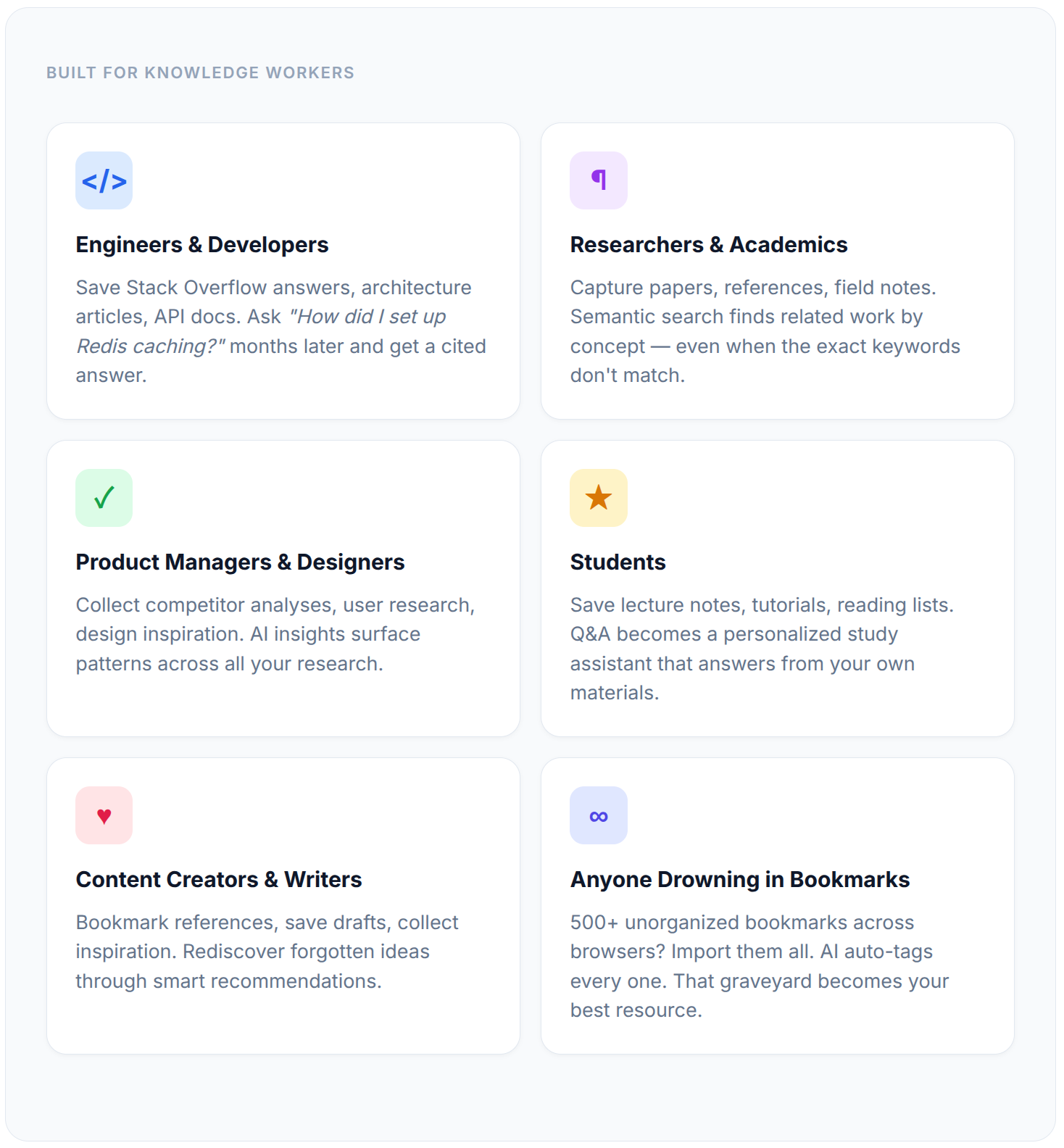
Who Is This For?
If you’ve ever thought “I know I saved something about this...” and then spent 20 minutes digging through bookmarks, note apps, and browser history — Mindweave is for you.
Built for Knowledge Workers
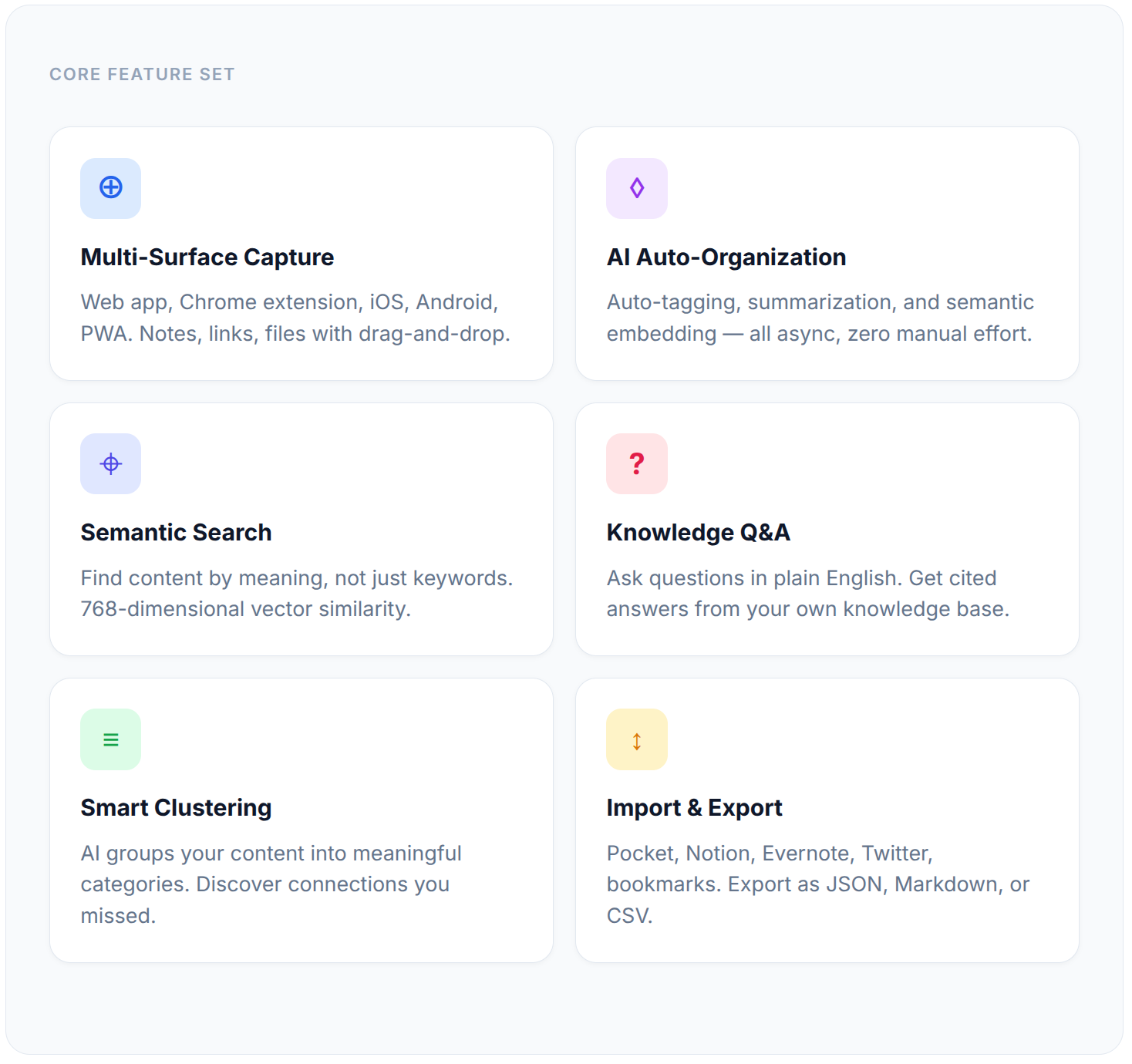
What Mindweave Does
Capture From Anywhere
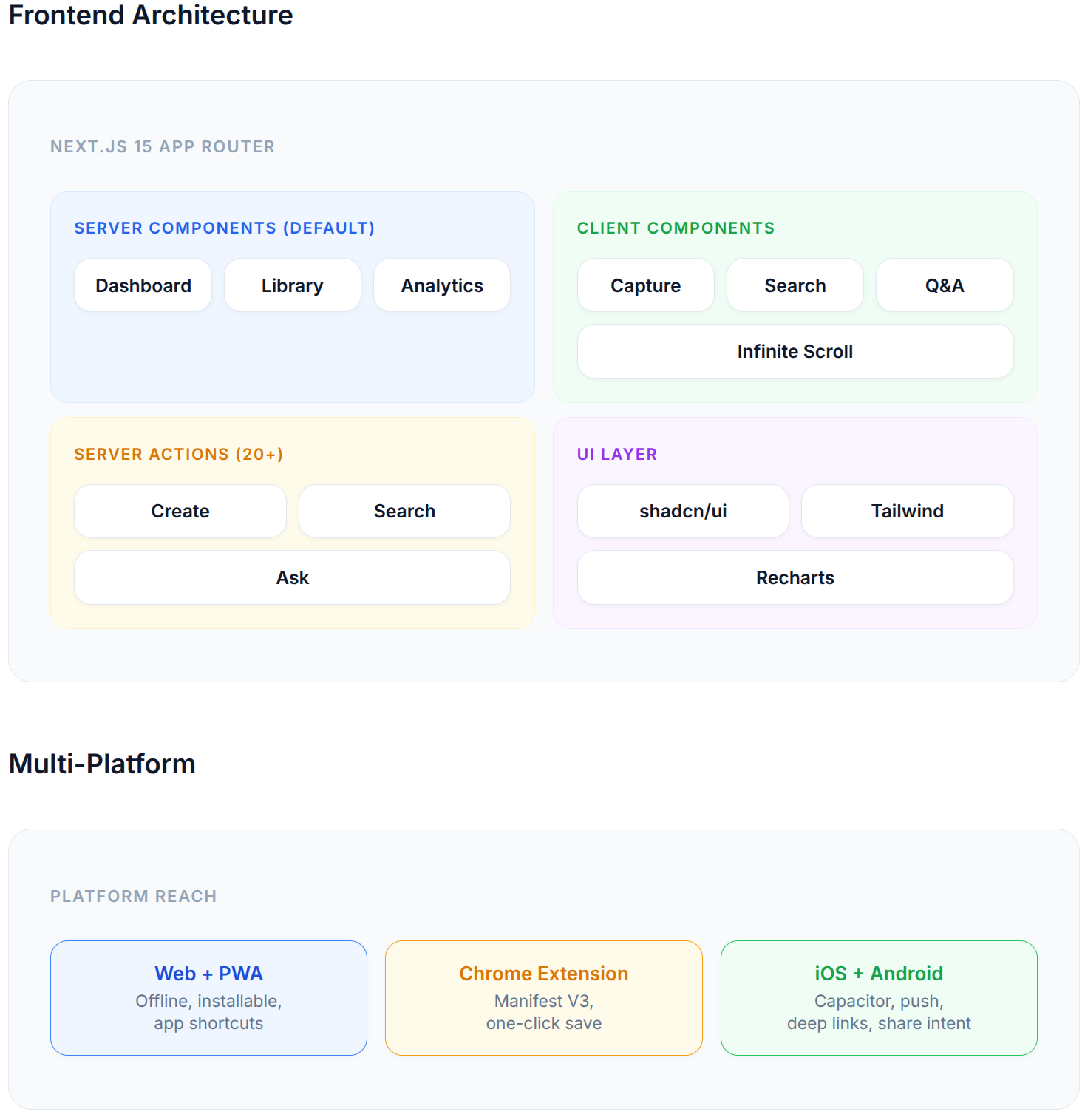
Mindweave meets you where you already are. Save content from the web app with a rich capture form, clip pages with one click from the Chrome extension, or capture on the go from iOS and Android. The web app is also a PWA — install it to your desktop or home screen for native-app feel with offline support.
Content types: notes (freeform text), links (URLs with auto-extracted metadata like title, description, and favicon), and files (documents, images, PDFs with drag-and-drop upload).
AI Does the Organizing
Here’s the thing that makes Mindweave different: you never have to organize anything. The moment you save content, AI takes over in the background:
Auto-tagging — Claude analyzes your content and generates 3-5 relevant tags. No manual labeling.
Auto-summarization — Every item gets a concise AI summary, so you can scan your library at a glance.
Semantic embedding — Each item is converted to a 768-dimensional vector, placing it in a “meaning space” alongside all your other content.
All of this happens asynchronously — the save is instant, AI enrichment runs in the background. You never wait.
Find Anything by Meaning
Keyword search works great when you remember the exact words. But what about “that article about scaling databases for high-traffic apps”? You didn’t save it with those words. With semantic search, Mindweave understands what you mean and finds content by concept — even if the exact keywords don’t match.
The search experience includes recent search history, AI-powered suggestions, and keyboard navigation. Results are ranked by relevance with content type badges and tag previews.
Ask Your Knowledge Base Questions
This is the feature that changed how I use my own knowledge. Instead of searching and manually reading through results, you just ask a question in plain English:
“What are the tradeoffs between server-side rendering and static generation?”
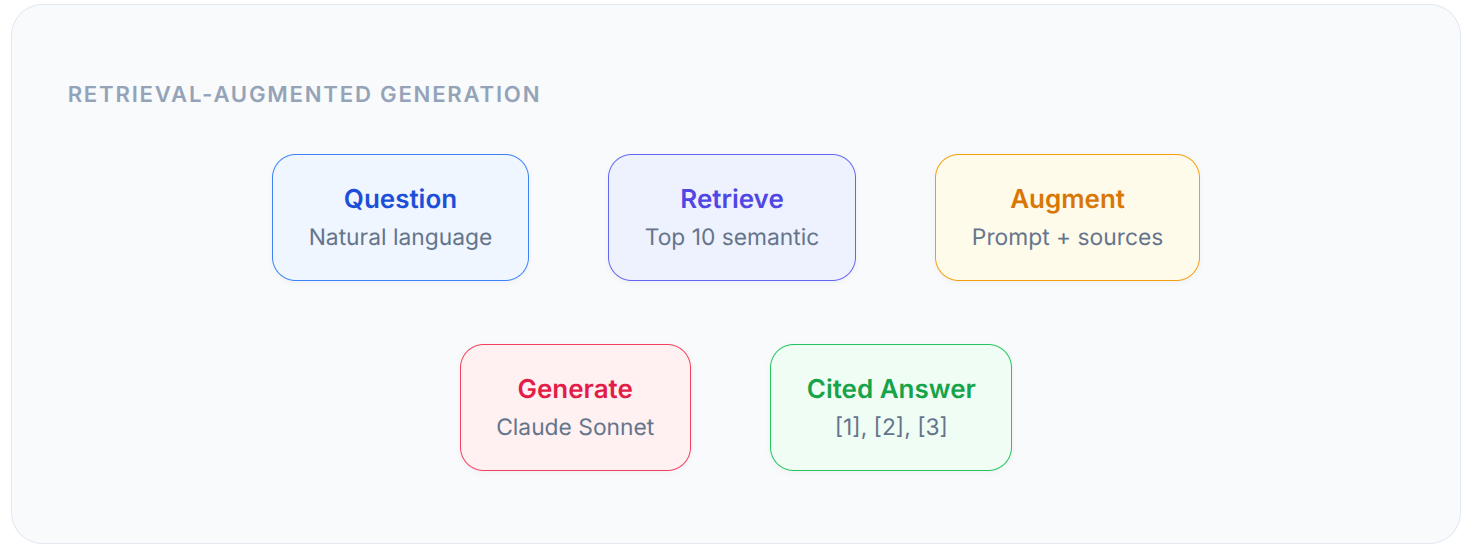
Mindweave retrieves the most relevant content from your knowledge base, feeds it to an AI model, and generates a cited answer with numbered references like [1], [2], [3] — each linking back to the original source. It’s like having a research assistant who’s read everything you’ve ever saved.
Collections, Sharing & Collaboration
Collections are color-coded folders for grouping related content — think “Interview Prep”, “Side Project Ideas”, or “Q3 Research”. They can be public or private.
Any piece of content can be shared via a public link — beautiful standalone pages with Open Graph metadata and Twitter Card support, so they look great when shared on social media. You can also create a public profile (/profile/@username) showcasing your public collections.
Bulk operations let you select multiple items and tag, share, delete, or add to a collection in one action.
Import Your Existing Knowledge
You don’t start from zero. Mindweave imports from 5+ platforms:
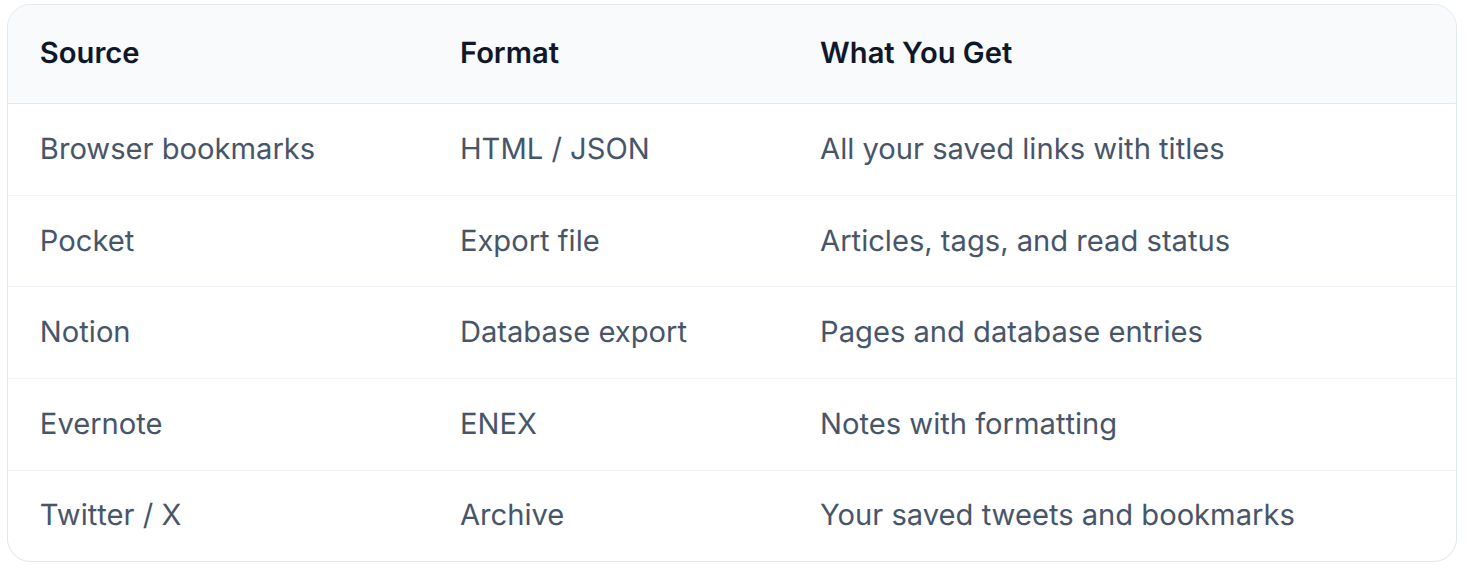
The import wizard lets you preview everything before importing and select exactly which items to bring in. Export anytime in JSON, Markdown, or CSV — your data is never locked in.
Analytics & AI Insights
The analytics dashboard shows you how your knowledge base is growing — content growth over time, tag distribution charts, collection usage, and content type breakdowns. But the real standout is AI-generated insights: Mindweave analyzes your entire knowledge base and surfaces patterns, identifies knowledge gaps, and suggests areas for exploration you might not have considered.
Smart Recommendations & Clustering
Every item in your library has a “View Similar” button that uses semantic similarity to surface related content — connections you might never have found by browsing. The library sidebar also features AI-generated content clusters that automatically group your content into meaningful categories like “Web Development”, “Project Planning”, or “Machine Learning” — no manual sorting required.
Polished UX Details
Dark mode — Light, Dark, and System theme with smooth switching.
Command palette (Cmd+K) — Quick navigation, theme switching, and actions from anywhere.
Infinite scroll — Cursor-based pagination that loads content seamlessly as you browse.
Guided onboarding — 3-step walkthrough for new users.
Feedback widget — Built-in bug reporting and feature requests.
Full accessibility — ARIA labels, keyboard navigation, skip links, screen reader support, WCAG AA color contrast.
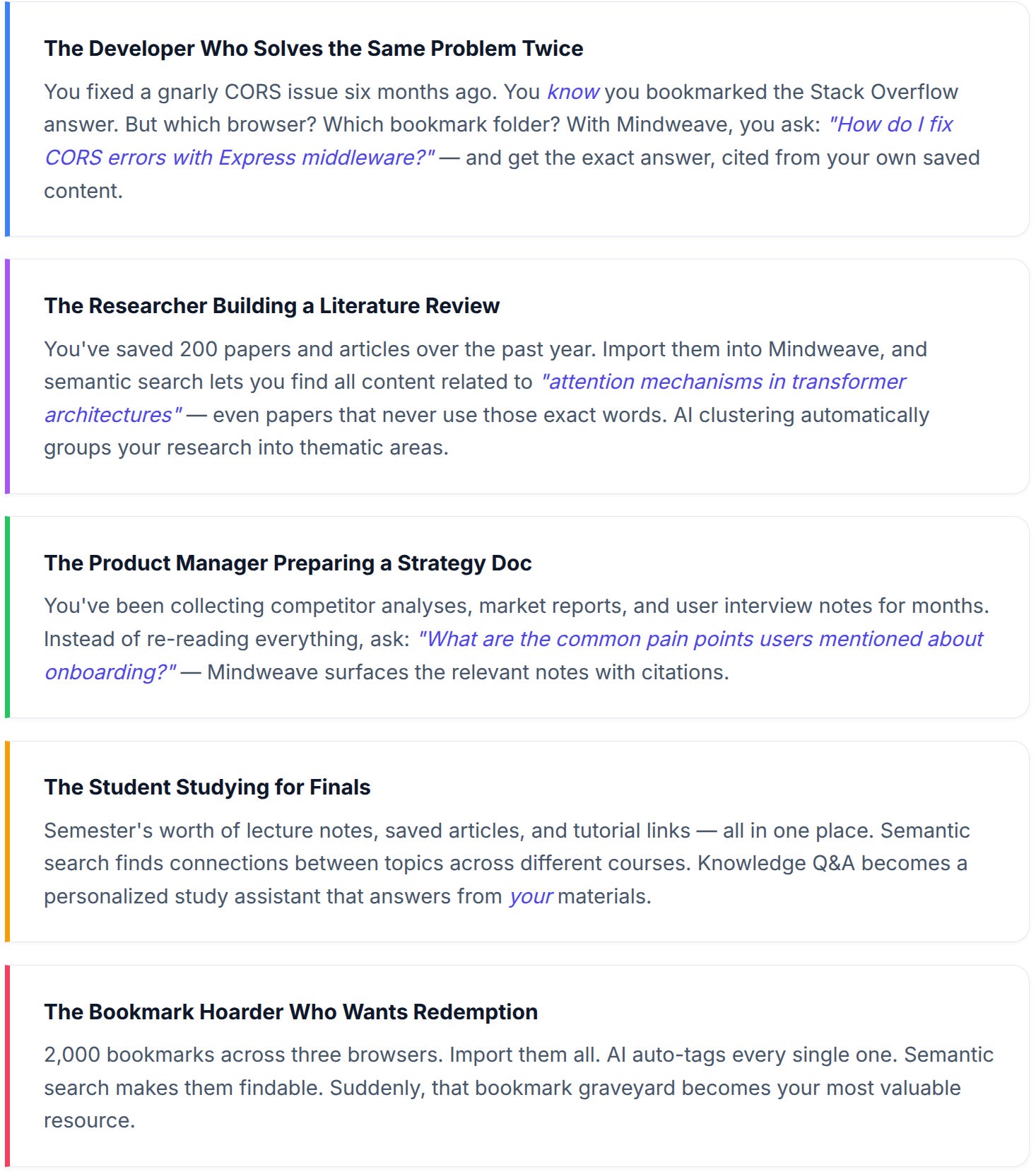
Real-World Use Cases
Here’s how different people actually use Mindweave day-to-day:
System Architecture
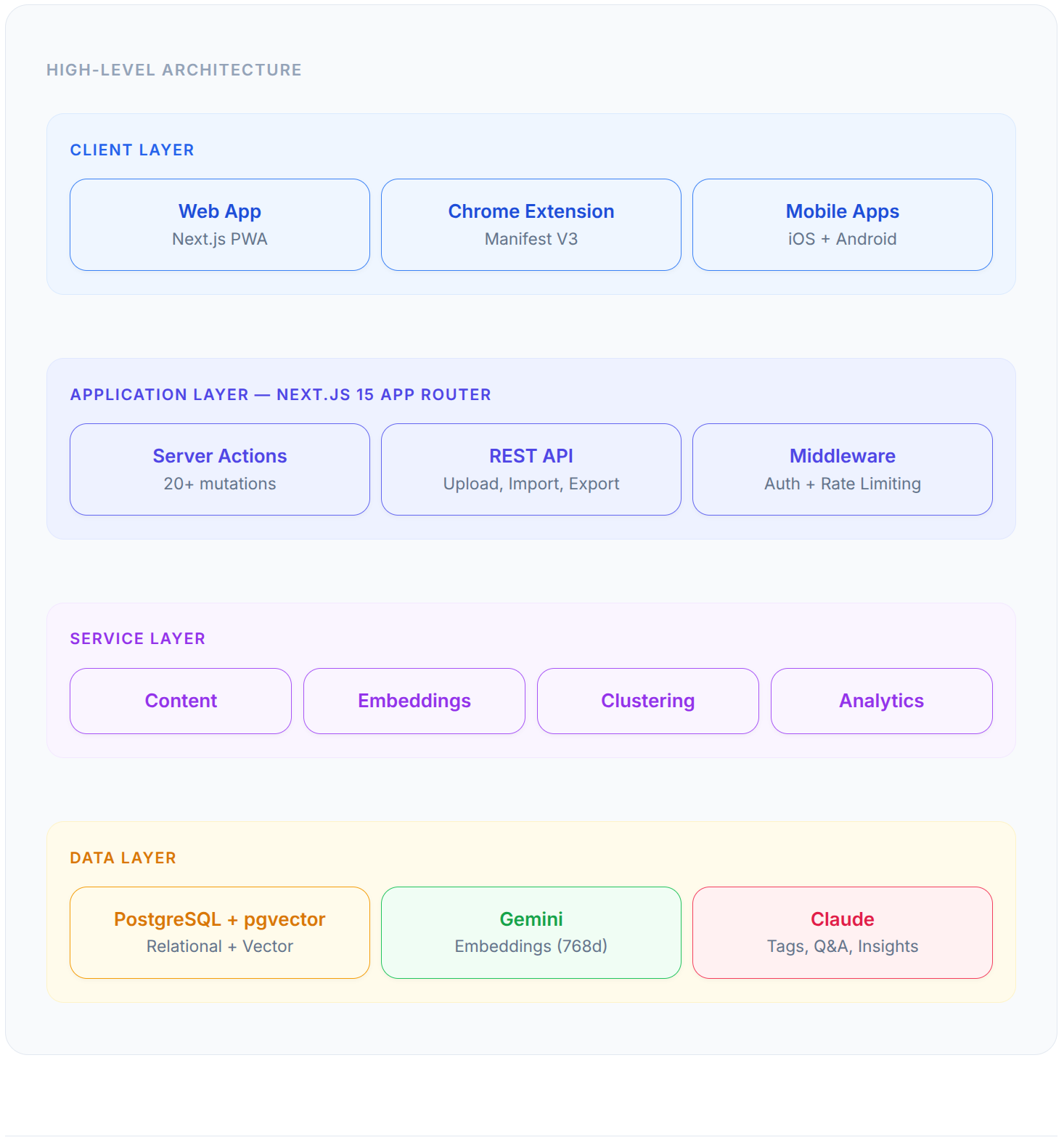
The Database: PostgreSQL + pgvector
I chose PostgreSQL 16 with pgvector — vector embeddings stored right alongside relational data. No separate vector database needed.
Schema Design
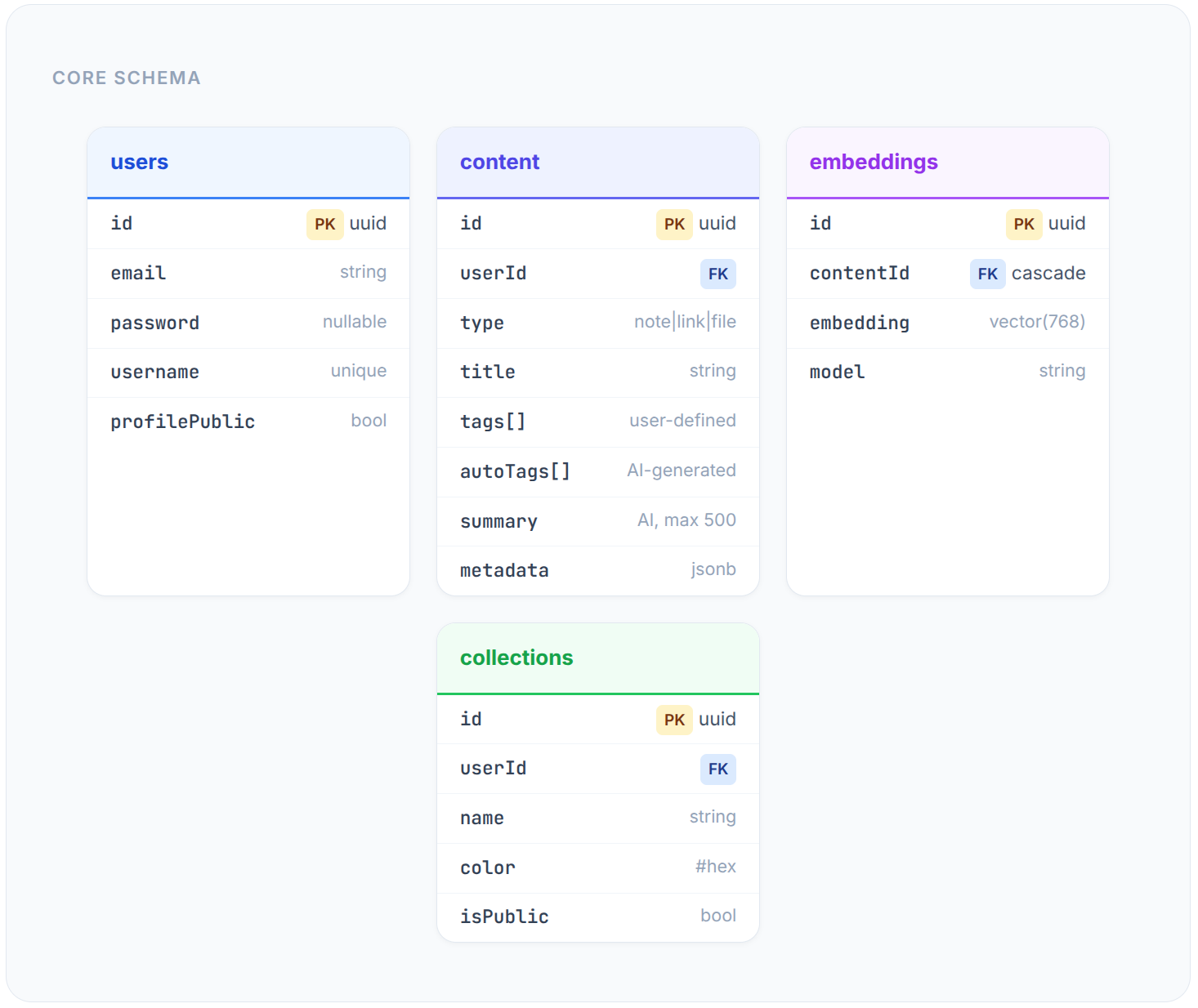
Key design decisions:
Tags as PostgreSQL arrays — enables
UNNEST-based searching. No join tables.JSONB metadata — flexible data (
fileType,favicon,domain) without schema bloat.Embeddings alongside content — pgvector’s
vector(768)column. One DB, one transaction boundary.Composite indexes —
(userId, createdAt),(userId, type),(userId, isFavorite).Cryptographic share IDs —
randomBytes(12).toString('base64url'). No guessable URLs.
Why Not a Separate Vector DB?
Simplicity — One database to manage, backup, and deploy.
Transactional consistency — Content + embeddings in the same transaction.
Cost — pgvector is free. Managed vector DBs charge per query.
Good enough scale — Cosine similarity with
<=>returns results in milliseconds.
The AI Pipeline
Every piece of content flows through a multi-stage AI pipeline:
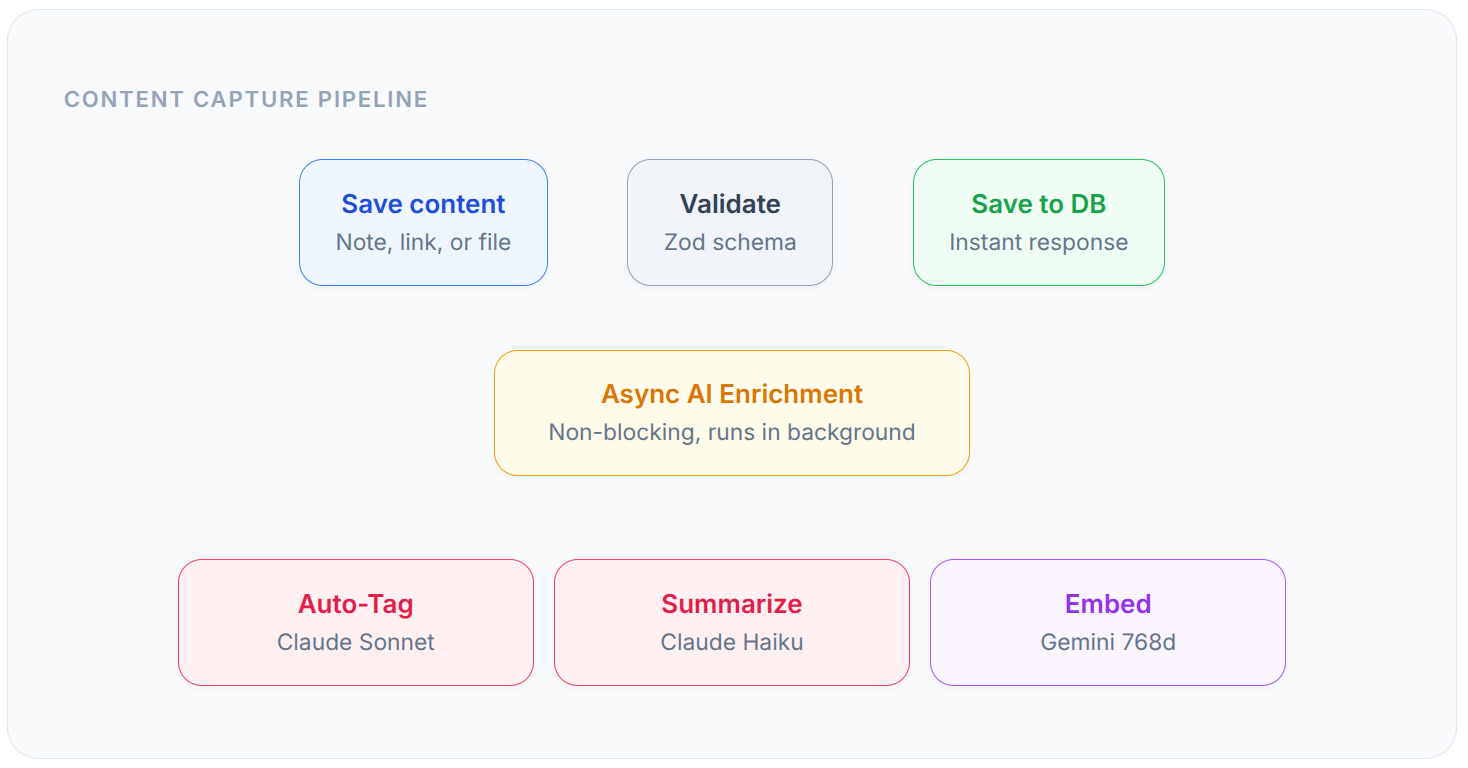
Key insight: Content is saved instantly. Tagging, summarization, and embedding all happen asynchronously. The user never waits for AI.
The Two-AI Architecture
Google Gemini handles embeddings — text-embedding-004, 768 dimensions, up to 10,000 chars input.
Anthropic Claude handles language — Sonnet for tagging + Q&A, Haiku for summarization.
Why two models? Cost optimization. Gemini is excellent for embeddings. Claude excels at nuanced language tasks.
Semantic Search
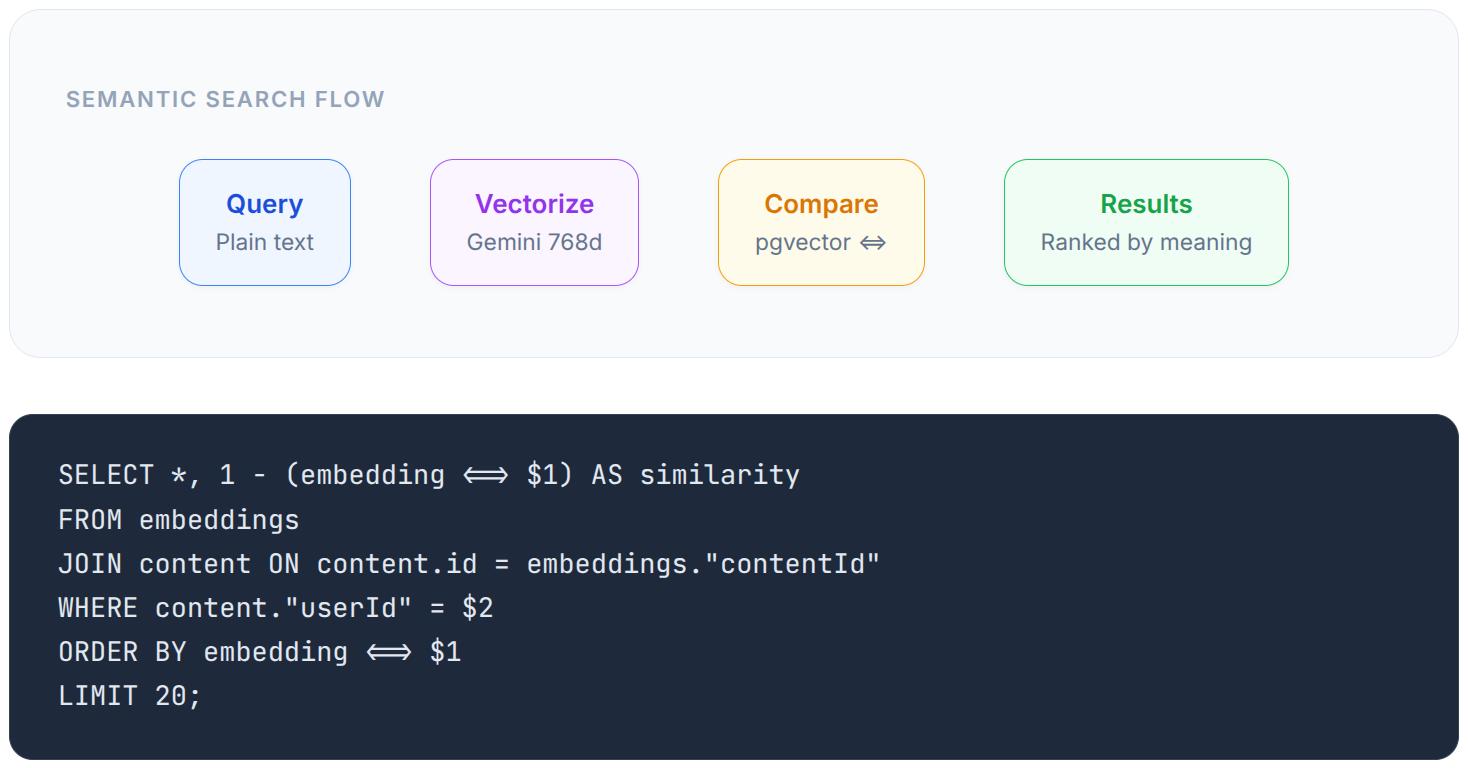
Knowledge Q&A: RAG Pipeline
Authentication & Security
Frontend to Deployment
Deployment Architecture
1,390+ Tests and Counting
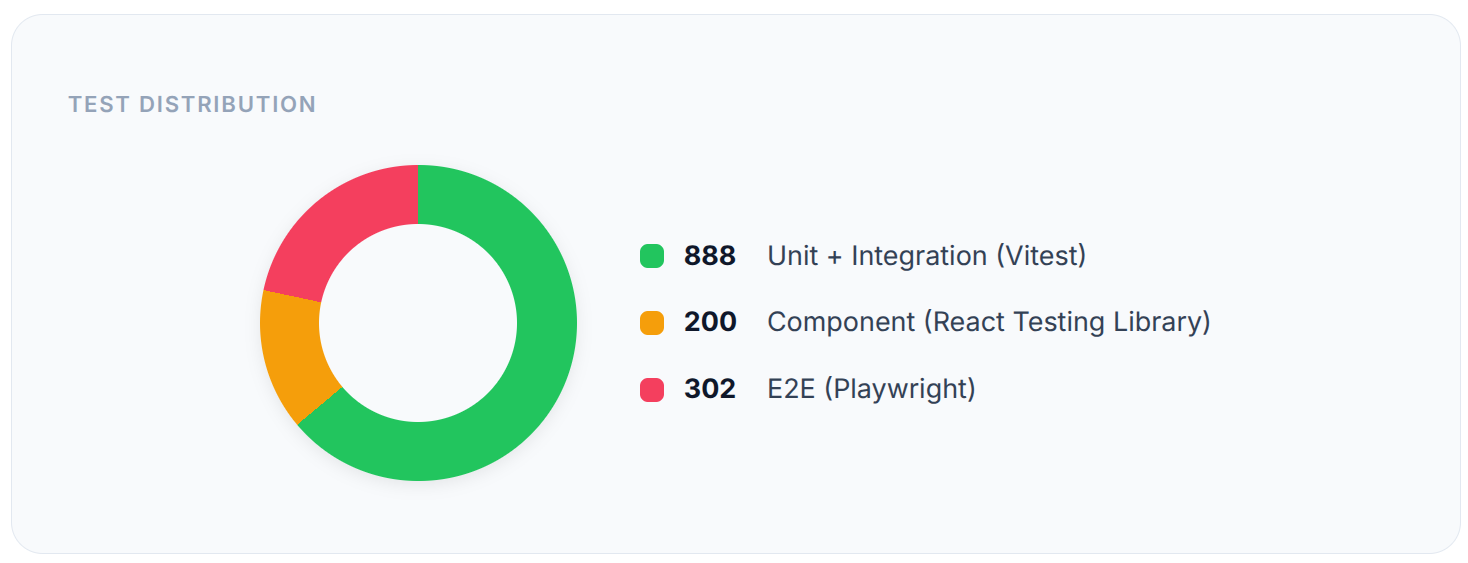
1,390+ tests. 80%+ coverage. 3 frameworks. All passing. The kind of test suite you’d expect from a team, not a solo developer.
Development Workflow
Feature branch —
feature/semantic-search, one at a time.Build + test — Unit, integration, component, E2E. Minimum 80% coverage.
Quality gates —
test+type-check+lint+buildmust all pass.Merge to main — Full test suite re-run. Any failure = stop and fix.
Update docs — STATUS.md and README.md after every feature.
AI-Assisted Development
I built Mindweave with Claude Code as an AI pair programmer — iterative, test-driven collaboration. Claude helped write tests alongside implementation, caught edge cases (like MIME type spoofing in uploads), and co-developed complex queries like UNNEST-based tag co-occurrence analysis.
Feature Highlights
Intelligent auto-organization — AI generates 3-5 tags, a summary, and a 768d embedding for every item. You do nothing.
Collections with custom colors and public/private visibility.
Bulk operations — batch delete, tag, share, or add to collection.
Import/Export — Pocket, Notion, Evernote, Twitter bookmarks. Export as JSON, Markdown, or CSV.
Analytics dashboard — Recharts visualizations + AI-generated insights.
Dark mode — Light, Dark, System. Persisted in localStorage.
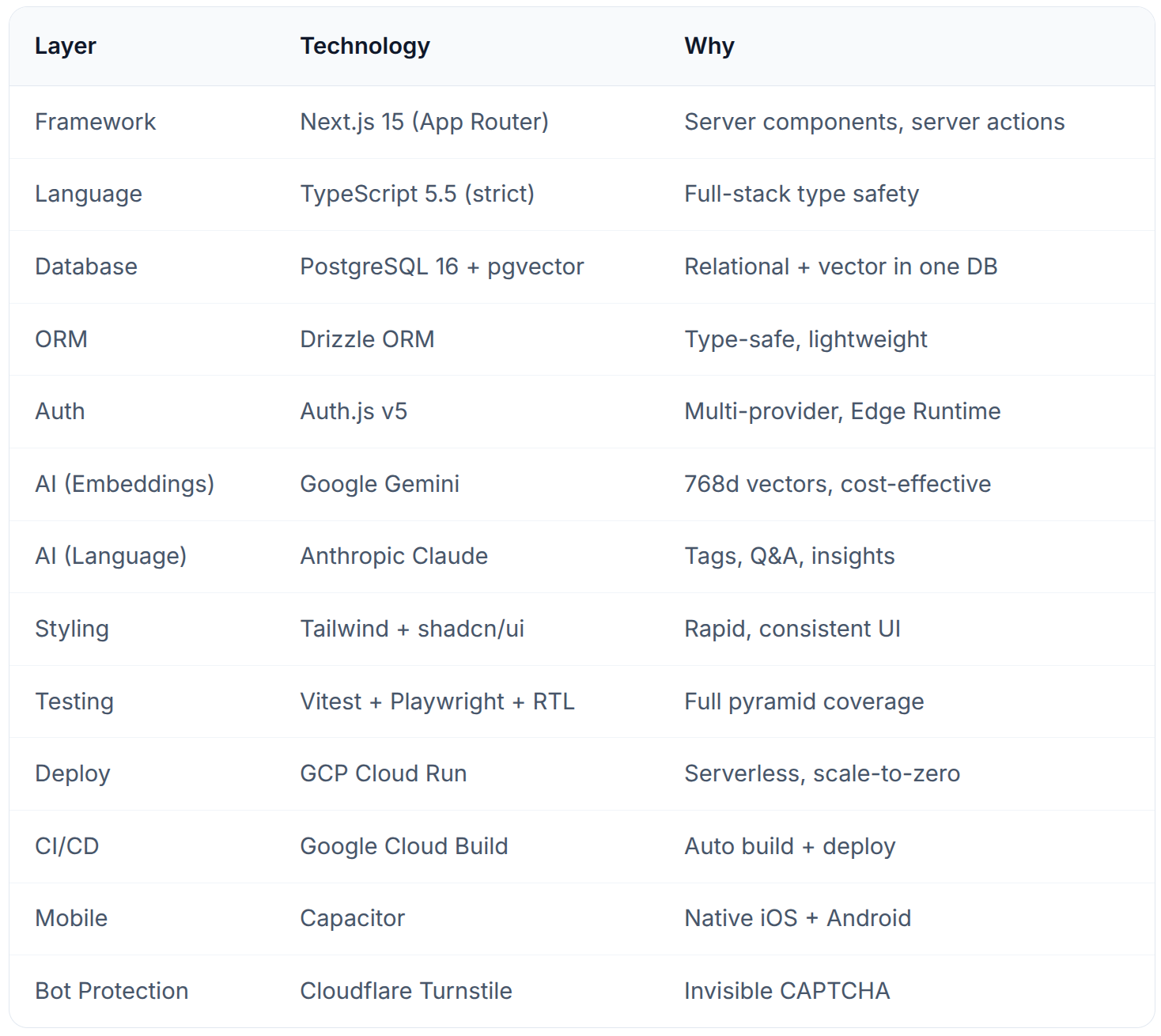
Tech Stack Summary
Lessons Learned
1. pgvector is underrated
For most AI apps, you don’t need a dedicated vector DB. pgvector gives you similarity search with full PostgreSQL power — joins, transactions, indexes. Start here.
2. Non-blocking AI operations matter
Save to DB instantly, run AI async. Users never wait for AI. This was the most important UX decision.
3. Two AI models beat one
Gemini for embeddings (commodity — use the cheapest good option). Claude for language (quality matters here).
4. TDD scales solo projects
1,390+ tests let me refactor anything with confidence. When I added clustering, tests caught 3 regressions I would have shipped.
5. Server Actions are a game-changer
They eliminated an entire API layer. No REST endpoints, no fetch calls, no serialization. Just TypeScript functions on the server.
Recent Updates (February 2026)
Since the initial launch, Mindweave has seen significant improvements across every layer:
Chrome Extension — Now on Chrome Web Store
The Mindweave Quick Capture extension is now available on the Chrome Web Store. One click saves any webpage with auto-captured title, URL, and content — AI tags it instantly.
Android App — In Closed Testing
A native Android app built with Capacitor is currently in Closed Testing on Google Play. It supports share-intent capture — share a link or text from any app directly into your Mindweave knowledge base.
Sample Content Seeding for New Users
New users no longer land on an empty dashboard. On completing onboarding, Mindweave seeds ~15 sample notes and links across 4 themes, each with AI auto-tags and vector embeddings. Users immediately experience semantic search, Q&A, analytics, and clustering without adding their own content first.
Security Hardening
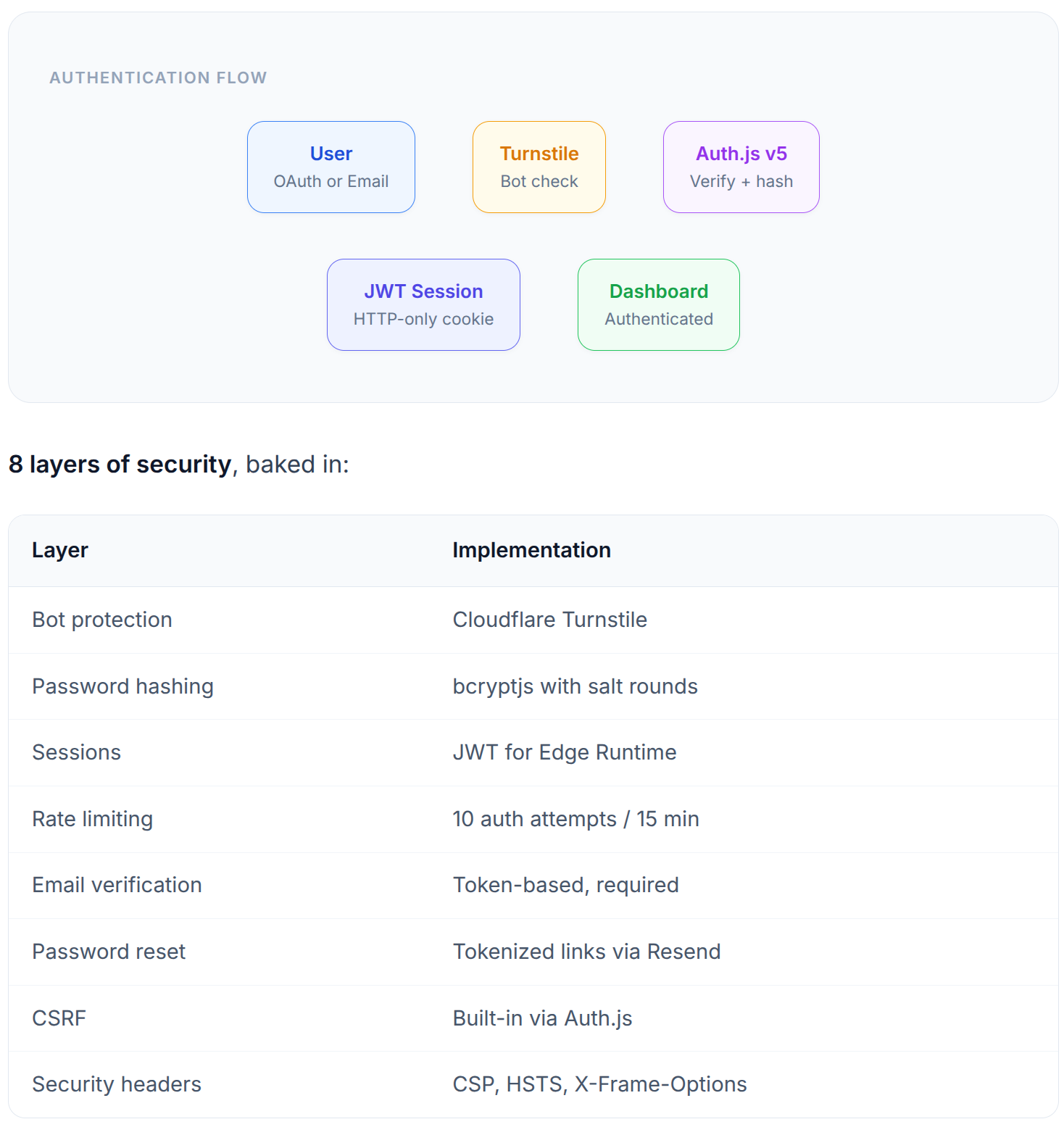
Cloudflare Turnstile — Invisible CAPTCHA on login/registration
Enhanced rate limiting — Per-email rate limiting on auth endpoints
SSRF protection — Server-side URL validation prevents internal network access
Data exposure fixes — Authorization checks tightened across all server actions
Dashboard & Analytics Improvements
Live dashboard stats — Real-time data for Total Items, Tags, This Week, and Favorites
Fixed analytics chart labels — Tag distribution donut chart no longer overlaps
Content clusters — Fixed JSON parsing and card height alignment
Clickable stats — All dashboard stat cards link to filtered library views
Tag Editing UX Fix
The TagInput component now exposes a commitPending() method via React.forwardRef, ensuring typed but uncommitted tag text is never silently lost on save.
File Card Open Link
Content cards for uploaded files now have a clickable filename that opens the file in a new tab.
What’s Next
Mindweave is live at mindweave.space. Planned:
Firefox extension
Collaborative features — shared knowledge bases for teams
Spaced repetition — surface content at optimal review intervals
Public API — let users build their own integrations
Try It / Get in Touch
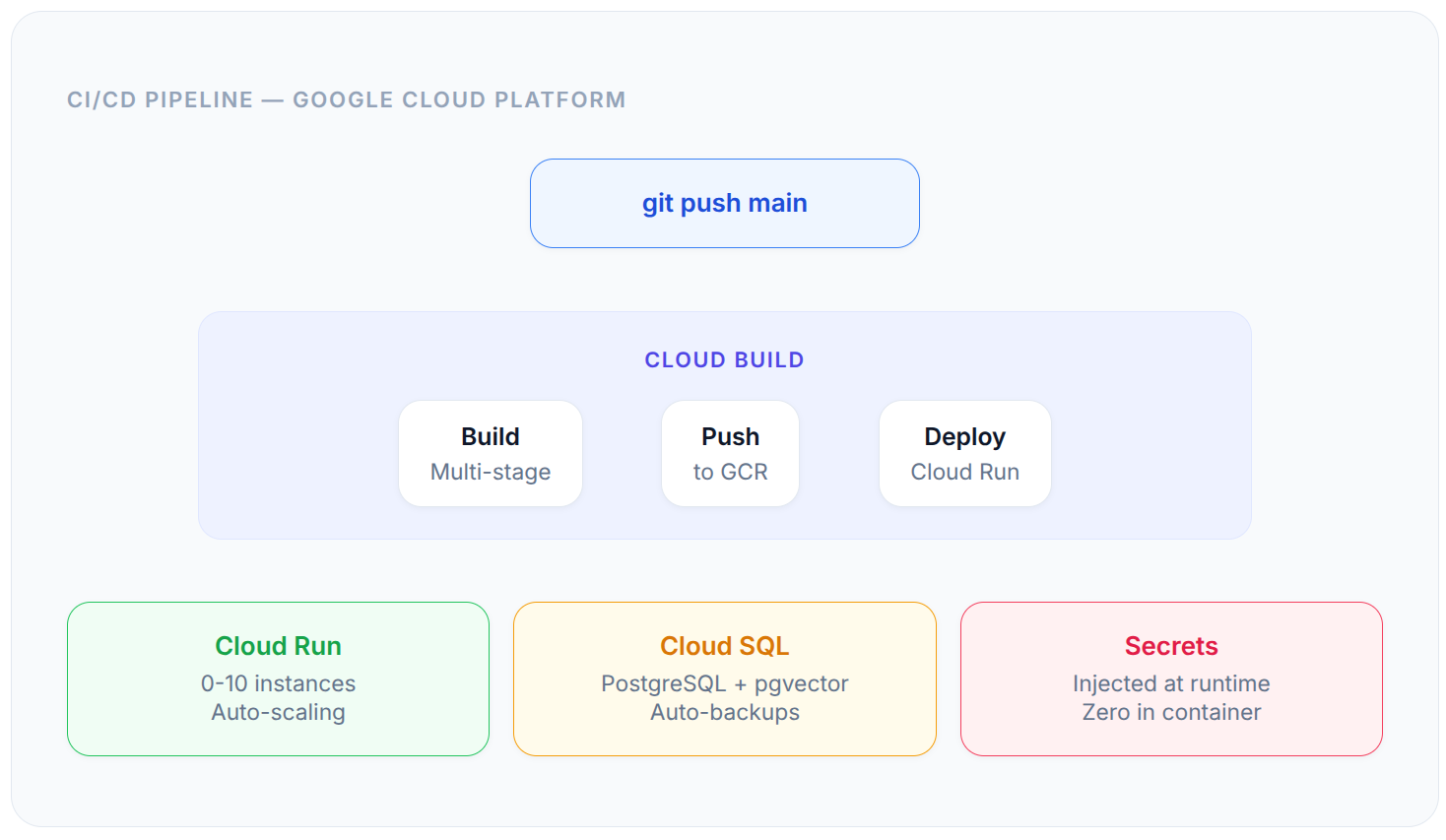
If you’re tired of your knowledge being scattered across 15 different apps, give Mindweave a try. The Chrome extension makes saving webpages effortless, and the Android app is coming soon. Drop a comment if you want a deep-dive on any specific layer.
A Note on This Soft Launch
This is Mindweave’s first soft launch — the product is live and fully functional, but we expect to discover bugs as more users start using it in real-world workflows. If you run into anything unexpected, please log it as an issue on GitHub:
Every bug report helps make Mindweave better. Include steps to reproduce, what you expected, and what actually happened. Screenshots are always appreciated.
Built with Next.js 15, PostgreSQL + pgvector, Google Gemini, Anthropic Claude, and deployed on Google Cloud Run. 1,390+ tests. One developer. Zero excuses for scattered knowledge.